
Google Ads Assets Explained
Benjamin Mangold
Assets – previously called ad extensions – allow you to add additional information to your ads. They can include things like extra links, phone numbers, images, pricing, and promotional details. When used well, assets help your ads stand out, improve your click-through rate, and drive more conversions.
This is important because assets also play a role in how Google calculates your Ad Rank. Google estimates the expected impact of your assets when determining where your ad appears – and whether it appears at all. This means that adding relevant assets is not just a nice-to-have. It can directly influence your ad's visibility and cost-per-click.
In this guide, I'll walk you through each type of asset available in Google Ads, explain when to use them, and share tips to help you get the most from each one.
Assets we're going to cover:
- What Are Assets in Google Ads?
- Sitelink Assets
- Callout Assets
- Structured Snippet Assets
- Image Assets
- Call Assets
- Lead Form Assets
- Location Assets
- Price Assets
- Promotion Assets
- App Assets
- Business Name and Logo Assets
- Best Practices for Using Assets
What Are Assets in Google Ads?
Assets are additional pieces of information that can be displayed alongside your ads. They give people extra details – like links to specific pages, phone numbers, images, prices, and more – without requiring any changes to your headlines or descriptions.
Google automatically decides which assets to show based on the user's search query, their device, and the predicted likelihood of improving performance. This means you won't always see every asset displayed with your ad. However, the more relevant assets you provide, the more opportunities Google has to enhance your ads and tailor them to each search.
There is no additional cost for adding assets to your campaigns. You are only charged when someone interacts with your ad – for example, by clicking a headline, a sitelink, or a call button.
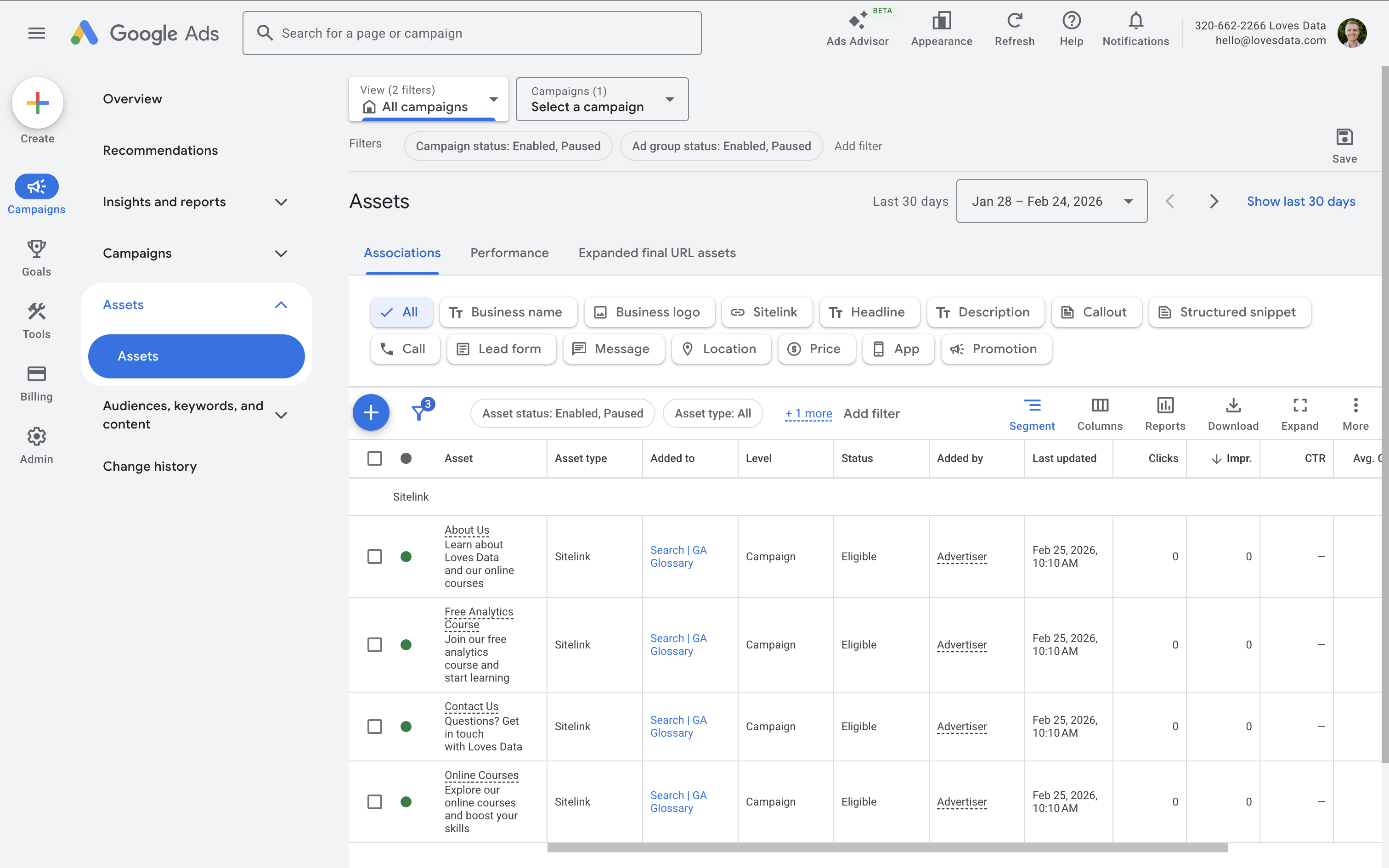
To view your assets, navigate to 'Campaigns' and select 'Assets' from the left-hand menu in Google Ads. You'll see the available asset types along with any historical performance data.
Sitelink Assets
Sitelink assets let you add additional links below your ad. These can direct people to specific pages on your website – giving users more options before they even click your main headline.
For example, instead of sending everyone to your homepage, you could link to your pricing page, a free trial signup, customer testimonials, or a specific product category.
Sitelinks are one of the most effective assets because they allow you to surface multiple calls-to-action within a single ad. Google typically shows between two and four sitelinks at a time, though this varies depending on the device and ad position.
You can add sitelinks at the account, campaign, or ad group level. Adding them at the ad group level gives you the most control, since you can tailor the links to match specific keywords and user intent.
Tip: Use sitelinks as secondary calls-to-action. Try to match your sitelinks to user intent and the objectives for the campaign or ad group. For example, a campaign targeting high-intent purchase keywords might benefit from sitelinks to product pages, while a brand awareness campaign might link to testimonials or case studies.
Common mistake: Using generic sitelinks like "Home" or "Contact Us" across all campaigns. Instead, tailor your sitelinks to each campaign's goals and the intent behind the keywords.
Callout Assets
Callout assets allow you to highlight short snippets of text that reinforce your value proposition. They appear as additional lines of text beneath your ad description.
Examples include phrases like "Free Shipping," "No Lock-In Contracts," "24/7 Support," or "Certified Experts."
Unlike sitelinks, callouts don't link to your website. They simply add credibility and highlight key selling points that might influence someone's decision to click.
Tip: Avoid repeating what's already included in the headlines or descriptions of your ads. Use callouts to add new information that complements your ad copy.
Common mistake: Writing callouts that are too vague, such as "Great Service" or "Quality Products." Be specific. A callout like "Same-Day Dispatch" or "30-Day Money-Back Guarantee" is much more compelling.
Structured Snippet Assets
Structured snippets allow you to showcase predefined categories of information, such as services, brands, courses, or product types. Unlike callouts, structured snippets follow a specific header format provided by Google.
For example, I use the following structured snippet with my branded campaign:
Courses: Google Analytics 4, Google Ads, Google Tag Manager
This format helps users quickly understand what you offer at a glance. You can create multiple structured snippets using different headers, and Google will choose the most relevant one to display.
When you create a new structured snippet, you first select a header category and then add up to 10 values under that header.
Tip: Choose the header category that most closely matches your business, even if the fit isn't perfect. Focus on listing your most relevant and popular offerings first.
Image Assets
Image assets allow you to display relevant visuals alongside your search ads. Adding an image can increase visibility and engagement, particularly on mobile devices where visual content stands out in the search results.
Google supports both square (1:1) and landscape (1.91:1) aspect ratios. Images must be at least 300 x 300 pixels and no larger than 5120 KB. Google recommends high-quality images with minimal text overlay.
You can add image assets at the account, campaign, or ad group level.
Tip: Clean, authentic visuals typically perform better than overly promotional graphics. Avoid images with heavy text overlays or cluttered designs – Google may reject images where text covers more than 20% of the image area.
Common mistake: Uploading low-resolution images or using generic stock photos that don't relate to the ad or landing page. Choose images that clearly represent your product or service.
Call Assets
Call assets allow users to click to call your business directly from your ad. On mobile devices, tapping the call button opens the phone dialer. On desktop, Google displays a phone number or QR code.
This is particularly valuable for local services, appointment-based businesses, and high-intent searches where someone is ready to take action.
You can schedule call assets to show only during business hours. If you're using a Search campaign, you can also enable Google forwarding numbers to track calls as conversions.
Tip: Make sure someone is available to answer the phone during the hours your call asset is active. Missed calls can mean missed revenue.
Common mistake: Showing call assets outside of business hours. If no one is available to take the call, it creates a poor experience and wastes the click.
Lead Form Assets
Lead form assets allow users to submit their details directly from Google search results, without needing to visit your website. This can reduce friction and increase lead volume, especially on mobile devices where navigating to a separate page can lead to drop-off.
You can customize the form fields, include qualifying questions, and connect leads to your CRM using a webhook or by downloading leads manually from Google Ads.
Keep in mind that lead quality from in-ad forms can sometimes be lower compared to website forms. This is because the barrier to submission is lower. Testing is essential to understand whether this asset type works for your business.
Tip: Add qualifying questions to your lead form to help filter out low-quality submissions. For example, a question about budget range or timeline can improve the quality of leads you receive.
Location Assets
Location assets show your business address, a map pin, and the distance from the user to your location. They are particularly effective for driving foot traffic to physical stores or offices.
To enable location assets, you need to link your Google Ads account to your Google Business Profile. Once linked, Google can display your address alongside your ads when someone searches nearby.
Tip: Make sure your Google Business Profile is accurate and up to date. Incorrect addresses or outdated hours can create a poor experience for people who visit based on your ad.
Common mistake: Forgetting to link your Google Business Profile, or having an incomplete profile with missing hours or contact information.
Price Assets
Price assets let you display specific products or services with pricing directly in your ad. Each price asset includes a header, a short description, a price, and a link to the relevant page on your website.
This helps pre-qualify clicks by setting expectations upfront. If someone sees your pricing and still clicks, they are more likely to convert. In industries where price is a major decision factor, these assets can be very effective.
You can organize price assets by categories such as product tiers, service packages, or event types.
Tip: Keep your pricing accurate and up to date. If your prices change frequently, review your price assets regularly to avoid showing outdated information.
Common mistake: Using price assets with vague descriptions. Be specific about what's included at each price point so users know exactly what they're getting.
Promotion Assets
Promotion assets allow you to highlight special offers, discounts, or seasonal sales directly in your ads. You can specify occasions – such as Black Friday, back-to-school, or end-of-year sales – or use custom promotions without a specific occasion.
These assets can help create urgency and make your ad more compelling, especially when competitors aren't highlighting similar offers.
You can set start and end dates for each promotion, which is helpful for time-limited offers.
Tip: Schedule your promotion assets in advance so they're ready to serve on the first day of a sale. This avoids delays from the review process.
Common mistake: Leaving expired promotions active. If someone clicks on an ad highlighting a discount that is no longer available, it creates a poor landing page experience.
App Assets
If you have a mobile app, app assets allow users to download it directly from your ad. This is useful if app installs are a core objective alongside your other campaign goals.
App assets display a link to your app in the App Store or Google Play, depending on the user's device. They can appear alongside your standard search ad, giving users the option to visit your website or download the app.
Tip: Only use app assets if app installs are a genuine priority. If driving website traffic is your main goal, app assets may divert clicks away from your landing page.
Business Name and Logo Assets
Business name and logo assets allow you to control how your brand appears in search ads. Instead of Google automatically pulling your business name and favicon, you can specify the exact name and logo to display.
These assets are particularly important for brand consistency and trust. A recognizable logo can increase confidence and make your ad stand out in the search results.
Google has specific formatting requirements for logos, including minimum resolution and aspect ratio guidelines. Make sure your logo is clear, legible at small sizes, and matches the branding on your website.
Tip: Upload your logo in both 1:1 (square) and 4:1 (landscape) aspect ratios to give Google more flexibility in how it displays your brand.
Best Practices for Using Assets
Now that we've covered each asset type, let's look at some practical recommendations for getting the most from your assets overall.
Add as Many Relevant Assets as Possible
Google recommends using at least four different asset types per campaign. The more relevant options you provide, the more combinations Google can test. This gives the system more flexibility to tailor your ads to each individual search.
Avoid Duplication Across Assets
Each asset should add new information. If your callouts repeat what's already in your sitelinks, you're missing an opportunity to communicate something different. Review your assets as a set and make sure each one contributes something unique.
Align Assets With Campaign Goals
Different campaigns have different objectives. A campaign focused on driving store visits should prioritize location and call assets. A campaign promoting an online sale should use promotion and price assets. Think about what your audience needs at each stage of the buying process and choose assets accordingly.
Review Performance Regularly
Navigate to 'Campaigns' and select 'Assets', then look at the performance data for each asset. Pay attention to which assets Google is actually serving versus which ones are eligible but rarely shown. If an asset has been active for a while with low impressions, consider updating the content or replacing it.
You can also check asset-level metrics like click-through rate and conversions to identify which assets are contributing the most value.
Test at Different Levels
Assets can be applied at the account, campaign, or ad group level. Account-level assets are useful for information that applies everywhere – like your business phone number. Campaign and ad group-level assets let you tailor the experience to specific audiences or keyword groups.
If you find that certain assets perform better in specific contexts, move them to the ad group level for more precise targeting.
Conclusion
Assets are one of the simplest ways to improve the performance of your Google Ads campaigns. They increase visibility, provide additional information, and give users more reasons to click. They also contribute to your Ad Rank, which means they can influence both your ad position and your cost-per-click.
If you haven't reviewed your assets recently, now is a great time. Navigate to 'Campaigns' and select 'Assets', then take a look at what you're currently using and where there are gaps. Small improvements here can make a meaningful difference to your overall results.