
Google Tag Manager Visual Event Builder Tutorial
 Benjamin Mangold
Google Tag Manager now includes a Visual Event Builder that can configure Google Ads purchase tracking without you manually creating variables, triggers, and tags.
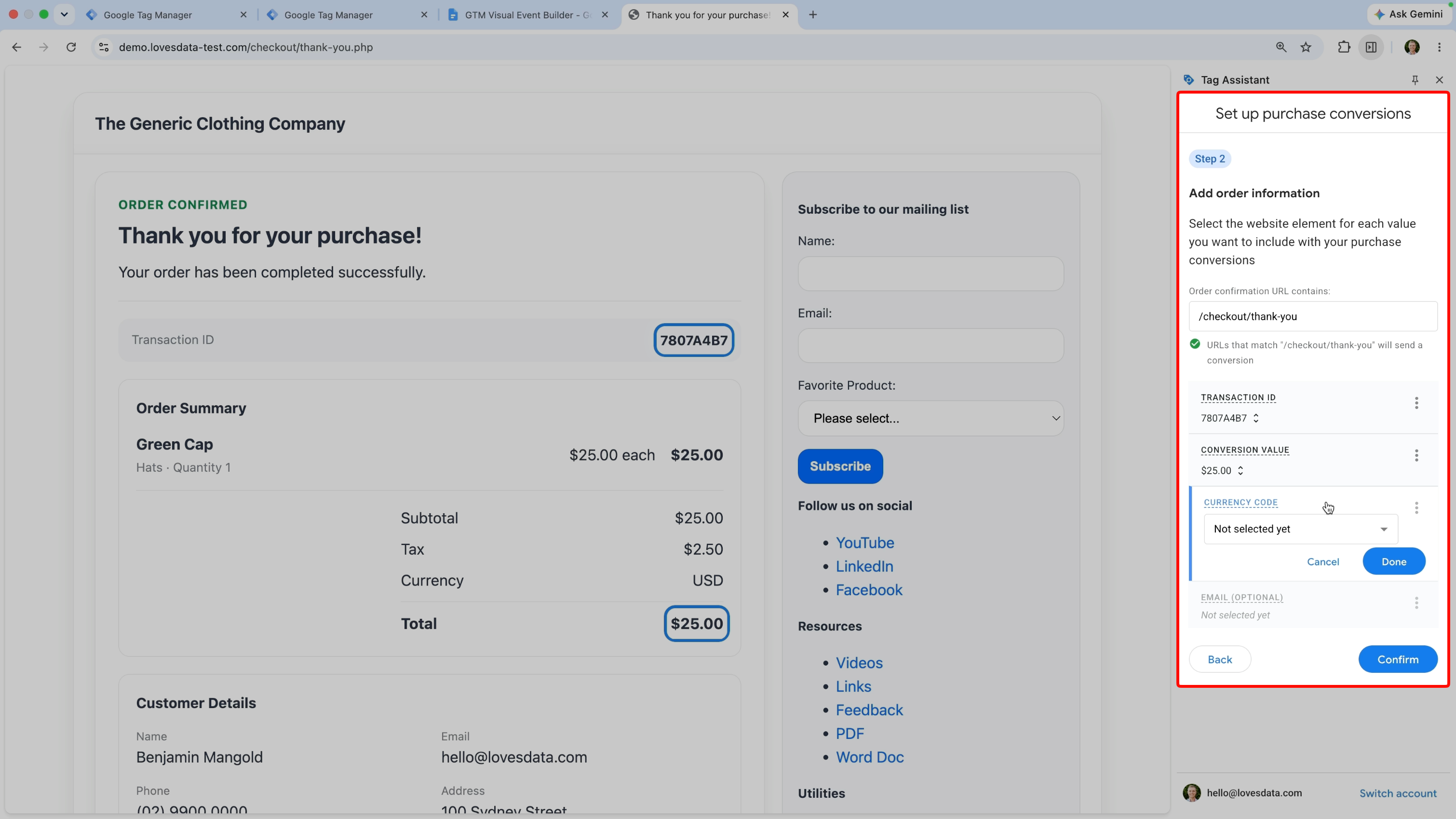
Instead of asking a developer to send purchase details to the data layer, you can use the guided setup to select the transaction ID, order value, and other details directly from your purchase confirmation page.
In this tutorial, I’ll show you how the Visual Event Builder works, what it creates in Google Tag Manager, and when I recommend using it instead of a traditional ecommerce data layer.
In this tutorial, you’ll learn how to:
- Set up Google Ads purchase tracking using the Visual Event Builder.
- Select the transaction ID, purchase value, currency, and customer email from your confirmation page.
- Review and test the tag, variables, and trigger created in Google Tag Manager.
- Decide whether the Visual Event Builder or a data layer is right for your website.
What does the Visual Event Builder do?
The Visual Event Builder guides you through a test purchase and lets you select the purchase details displayed on your order confirmation page.
Google Tag Manager then creates the Google Ads conversion tag, variables, and trigger needed to measure the purchase. This can make the setup much easier if you don’t have access to a developer or a suitable ecommerce integration.
However, it’s important to understand that the Visual Event Builder reads information from the page. This means the setup depends on the content and structure of your confirmation page remaining consistent.
When should you use it?
I think the Visual Event Builder is a good option if you don’t already have purchase tracking, you only need to measure purchases in Google Ads, and you want to get tracking working quickly.
It can be especially useful when there isn’t a built-in plugin or integration available and you don’t have access to a developer.
Before publishing, make sure you test different types of transactions and confirm that the purchase value, currency, and transaction ID are being collected correctly.
When should you use a data layer instead?
If you’re already using a data layer, measuring ecommerce in Google Analytics, working with multiple marketing platforms, or planning to use server-side tagging, I recommend continuing to use the data layer.
A data layer requires more work upfront, but it sends structured purchase information directly from your website to Google Tag Manager. This makes it more robust and less likely to break when the design of your confirmation page changes.
So, if you only need Google Ads purchase tracking and don’t have another implementation available, the Visual Event Builder is a practical option. But if you’re building a complete ecommerce measurement setup, I’d still recommend using a data layer.
Are you planning to use the Visual Event Builder, or will you continue using a data layer? Let me know in the comments!