
Server-Side Google Tag Manager Tutorial Series (with Stape)
 Benjamin Mangold
If you're implementing Google Tag Manager today, server-side tagging is becoming an increasingly important part of a modern measurement strategy. While many websites still rely entirely on client-side tagging, browser privacy features, ad blockers, and the move toward first-party measurement mean server-side tagging is now worth considering for most websites.
In this guide, we'll briefly look at what server-side tagging is, why it's becoming more important, and then I'll share my complete tutorial series showing you how to set up server-side Google Tag Manager using Stape.
What's Covered
- What is server-side Google Tag Manager?
- Why consider server-side tagging?
- What you'll learn in the tutorial series
- Watch the tutorial series
- Frequently asked questions
What Is Server-Side Google Tag Manager?
Let's briefly look at what we mean by server-side tagging.
Most websites still use web containers in Google Tag Manager. This means tags, like the Google tag for Google Analytics and Google Ads, load in people's browsers. This is known as client-side tagging, and it's worked well for many years. However, browser privacy features, ad blockers, and other technologies can affect the quality and completeness of the data that's collected.
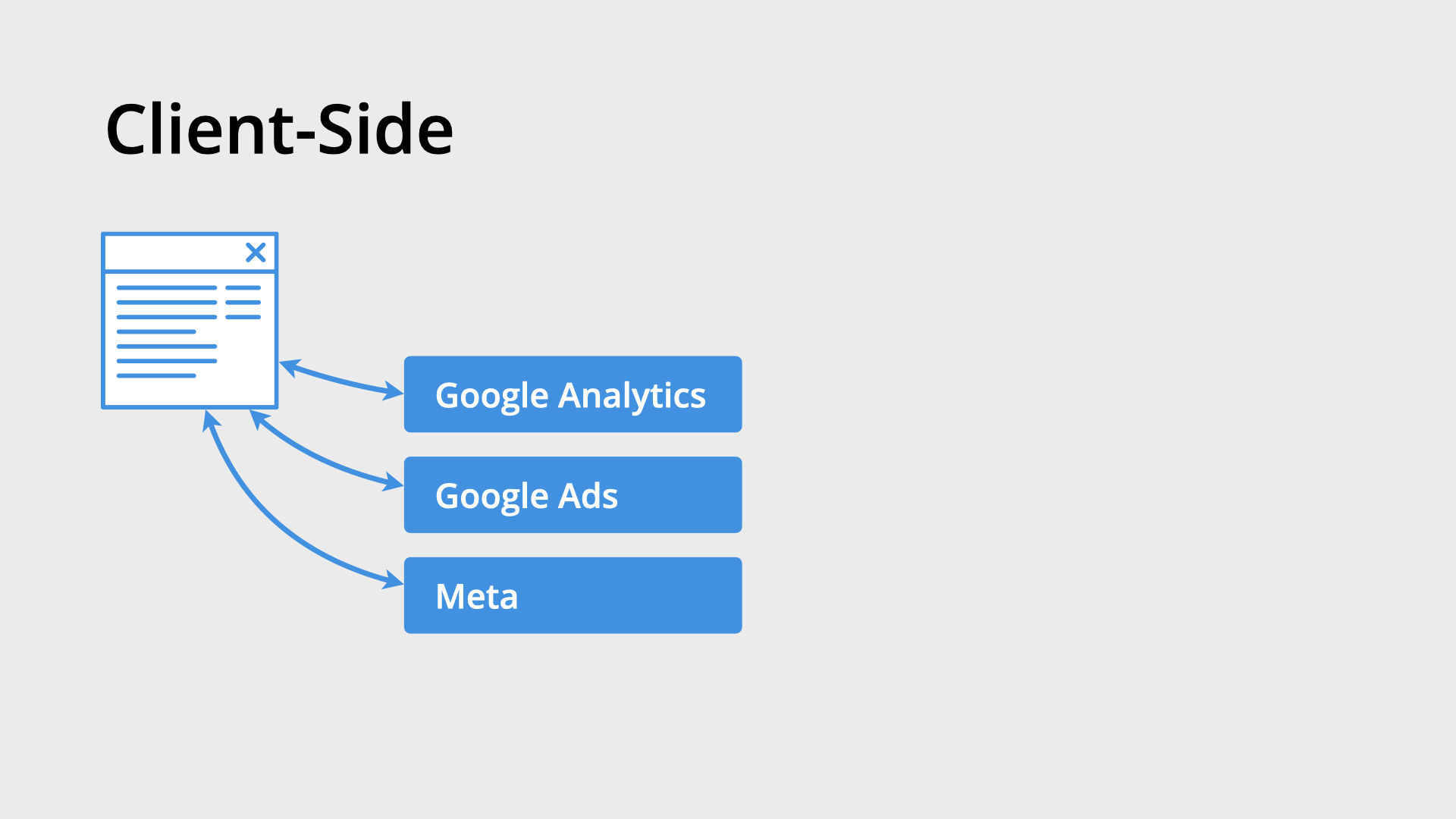
With server-side tagging, your website sends data to a server-side Google Tag Manager container first. The server-side container then forwards that data to platforms like Google Analytics, Google Ads, Meta Ads, and others. This gives you greater control over your measurement implementation and can improve the reliability of your tracking.
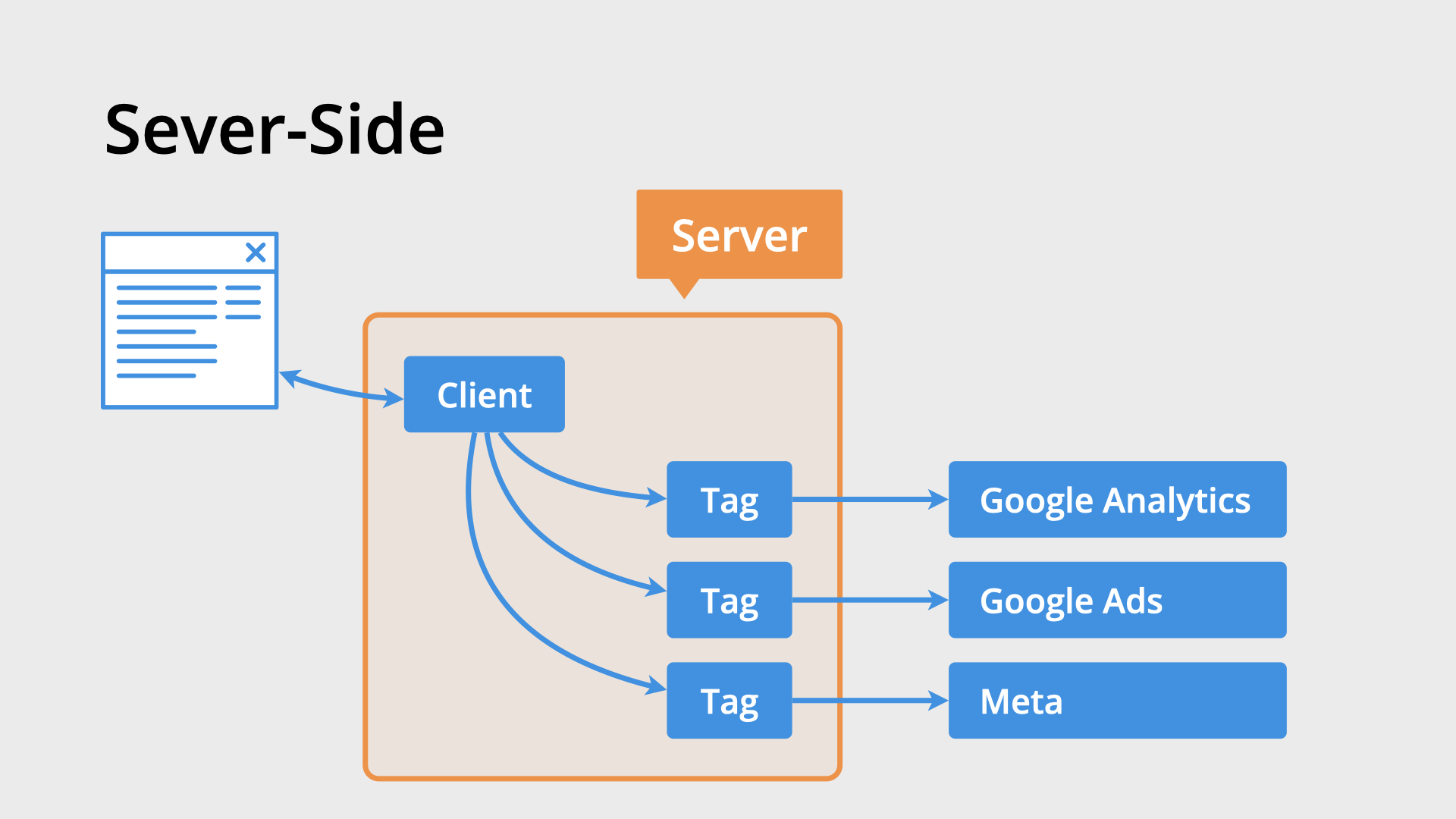
For example, instead of loading separate Google Analytics, Google Ads, Floodlight, Meta, and other marketing tags in the browser, your website can send a single request to your server-side container. The server-side container then decides which platforms should receive the data. This reduces the amount of JavaScript running in the browser while giving you more control over your implementation.
Why Consider Server-Side Tagging?
There are plenty of reasons to implement server-side tagging, but these are the three biggest benefits:
1. Improved data quality. Server-side tagging can help collect data that client-side implementations sometimes miss. This is particularly valuable for conversion tracking, revenue reporting, and other important business metrics.
2. Better browser performance. Because fewer marketing tags need to run in the browser, visitors download less JavaScript and pages can become more responsive.
3. Greater control over your measurement. Server-side tagging gives you more flexibility over how data is processed and shared with your marketing and analytics platforms. Combined with first-party measurement strategies, it's becoming an increasingly common approach for modern tracking implementations.
What You'll Learn in This Series
To help you get started, I've created a complete tutorial series that walks through setting up server-side Google Tag Manager using Stape. Whether you're starting from scratch or migrating an existing implementation, you'll be able to follow along step-by-step.
The series is sponsored by Stape, who provide managed hosting for server-side Google Tag Manager. Throughout the series, you'll configure a complete implementation from start to finish using Stape's managed hosting platform. Compared to managing your own setup on Google Cloud, you'll also be pleasantly surprised by how affordable it can be.
Here's what you'll learn:
- Foundation and concepts – understand what server-side Google Tag Manager is, how it differs from client-side tagging, and when to use it.
- Setting up Stape – create your server-side container, configure Stape, and connect everything together.
- Building your implementation – implement Google Analytics, Google Ads conversion tracking, and other common server-side tagging techniques.
By the end of the series, you'll have a complete server-side Google Tag Manager implementation using Stape. You'll understand how server-side tagging works, why it's becoming an important part of modern measurement, and how to use it to improve your tracking implementation.
Watch the Tutorial Series
Extra Resources
- Stape managed hosting for server-side containers
- Google's official Tag Manager documentation
- Explore our Google Analytics, Google Ads, Google Tag Manager, and Data Studio courses for more in-depth training.
Frequently Asked Questions
What is server-side tagging?
Server-side tagging sends tracking data to a server-side Google Tag Manager container before forwarding it to platforms like Google Analytics and Google Ads. This provides greater control over your measurement implementation and can improve data quality.
Do I need server-side tagging?
Not every website requires server-side tagging, but it's becoming an increasingly common best practice for organizations that rely on accurate marketing and analytics data.
Do I have to use Stape?
No. You can host a server-side Google Tag Manager container yourself, including on Google Cloud. However, managed hosting providers like Stape simplify the setup process and ongoing maintenance.
Conclusion
Server-side tagging is becoming an important part of modern measurement. Whether you're looking to improve data quality, simplify your tracking implementation, or prepare for a more privacy-focused web, this tutorial series will walk you through the complete setup using Stape.
Watch the videos above to follow the implementation step-by-step, and if you'd like to continue learning, be sure to explore my Google Tag Manager and Google Analytics courses and other tutorials.